Why Your Monoblock Finds the Wrong Satellite
You select Hot Bird 13°E on your satellite receiver, start a scan, and suddenly Astra 19.2°E channels appear. Switch to Astra, and the receiver may find Hot Bird services instead. The dish has not moved, both feeds may be receiving signals, and the scan even reports successful results. So why is your monoblock finding the wrong satellite?
The most common configuration issue to investigate is a mismatch between the receiver’s satellite labels and the physical receiving paths selected by the monoblock. A receiver does not automatically identify an orbital position simply because you choose its name from a menu. It sends tuning and switching commands according to stored settings. If the DiSEqC assignments are reversed, the receiver can successfully acquire a carrier from the unintended satellite and store the resulting services under a misleading label.
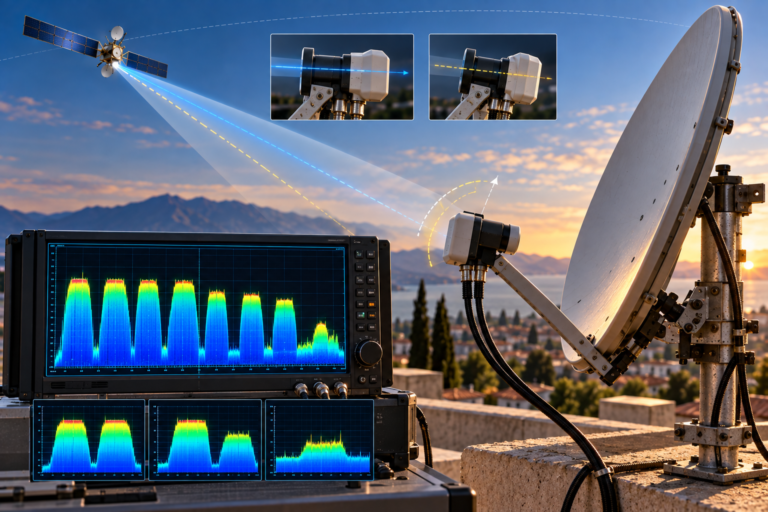
Astra 19.2°E and Hot Bird 13°E can be received through one compatible offset reflector using a six-degree-class monoblock LNB. The monoblock contains two feed paths and a satellite-selection mechanism. Which path responds to a particular DiSEqC command depends on the exact product. The receiver’s satellite name, the selected physical feed, and the actual source of the incoming carrier must therefore be distinguished during troubleshooting.
Why a Receiver Can Find the Wrong Satellite
A satellite receiver usually maintains a database containing satellite names, transponder parameters, and tuner configuration information.
Selecting Hot Bird 13°E tells the receiver to use the settings associated with that database entry.
It does not independently establish that the antenna is receiving Hot Bird.
If the receiver selects the wrong monoblock feed, it may actually receive signals from Astra 19.2°E.
A Successful Scan Does Not Prove Correct Satellite Selection
Some users assume that finding channels confirms the correct satellite.
However, a receiver can find services from an unintended orbital position when its switching and tuning conditions allow it to acquire those transmissions.
This can happen during a blind scan, a scan with inappropriate database assignments, or another scanning operation that accepts services from the selected physical feed.
Whether the receiver stores those services under the incorrect satellite label depends on its firmware and database behavior.
Why the Problem Is Easy to Miss
Many popular satellites carry television services using similar broadcasting standards and Ku-band receiving equipment.
A tuner can therefore acquire signals from more than one satellite position when the corresponding antenna feed is selected and valid tuning conditions are available.
Without checking the actual transport or service identity, the user may mistake channel discovery for satellite identification.
Satellite Names Versus Physical RF Paths
The key distinction is between the logical configuration inside the receiver and the physical signal path provided by the antenna system.
The Logical Satellite Entry
A receiver database may contain entries labeled Astra 19.2°E and Hot Bird 13°E.
Each entry can have associated transponder lists, LNB settings, and DiSEqC commands.
Those labels help organize configuration and services, but their accuracy depends on the underlying settings.
The Physical Receiving Feed
A monoblock contains feed assemblies designed to receive different satellite directions.
The reflector directs incoming energy from each orbital position toward the appropriate receiving feed.
An internal switching arrangement selects which feed path reaches the receiver.
If the logical satellite entry selects the wrong feed, the receiver may tune the wrong orbital position regardless of the name shown on its screen.
Satellite label: The name stored in the receiver.
DiSEqC selection: The command used to choose a receiving path.
Actual satellite: The orbital source of the acquired carrier.
These three must correspond correctly for reliable dual-satellite configuration.
How Monoblock DiSEqC Switching Works
DiSEqC is a control system used by compatible satellite receivers to communicate with switching and other receiving equipment over a coaxial connection.
In a conventional monoblock installation, the receiver can send a command to select the desired satellite feed.
The monoblock’s integrated switching electronics respond according to their design.
What DiSEqC Actually Changes
When a compatible command is received, the monoblock selects one of its receiving paths.
This changes which satellite feed supplies the receiver’s RF input.
It does not physically rotate the dish or move the feed assemblies.
Mechanical pointing and electronic feed selection are separate operations.
DiSEqC 1.0 and Toneburst
Many conventional monoblock products support DiSEqC 1.0 switching, while some also support Toneburst, sometimes called Mini DiSEqC.
Support varies by product.
The receiver should use the control method specified by the monoblock manufacturer.
Do not assume that every two-satellite device responds to all switching modes in the same way.
Why 22 kHz Band Selection Is Different
In a conventional universal Ku-band receiving system, a 22 kHz tone commonly controls low-band versus high-band selection.
This is not the same function as a DiSEqC command selecting Astra or Hot Bird.
Similarly, the nominal 13V and 18V control states commonly select vertical and horizontal polarization.
Incorrectly combining these functions in receiver settings can create confusing reception symptoms.
Why Port A and Port B Are Not Universal
A common troubleshooting mistake is assuming that Astra must always be assigned to Port A or that Hot Bird must always be assigned to Port A.
There is no safe universal assignment that can replace the instructions for the installed monoblock.
A Verified Inverto Example
The Inverto IDLM-SIM410-MN006-8PX six-degree monoblock is designed for dual reception of Hot Bird 13°E and Astra 19.2°E with a compatible 80cm offset dish.
Its product specification identifies:
- Satellite A: Hot Bird 13°E.
- Satellite B: Astra 19.2°E.
For this particular model, the manufacturer also specifies the Satellite A path as the default before a DiSEqC command has been received.
These details describe that model, not every Inverto product or every monoblock sold by other manufacturers.
Why Copying Another Receiver’s Settings Can Fail
An installer may follow an online guide showing Astra on one port and Hot Bird on the other.
If the guide describes a different monoblock, those settings may select the opposite feeds.
Both satellites can then appear to be mislabeled or one may seem completely unavailable.
Before changing the dish, inspect the exact model number and its satellite-to-port assignment.
A/B and Numbered Ports
Some receivers use Port A and Port B, while others display numbered inputs or alternative switching labels.
The interface terminology must be interpreted according to the receiver’s documentation.
Do not assume two different interfaces express the same switching sequence identically without verification.
How to Prove Which Satellite Is Actually Being Received
Correct identification should use evidence from the received digital transmission rather than the receiver’s satellite label alone.
Start With Verified Reference Transponders
Select a currently active and independently verified reference carrier for Astra 19.2°E.
Choose another known carrier for Hot Bird 13°E.
Record the relevant frequency, polarization, symbol rate, and supported transmission characteristics.
Do not use old transponder data without checking that the carrier is still active.
Check Actual Carrier Lock
Use the receiver or an appropriate satellite analyzer to determine whether the selected carrier locks.
A signal-strength percentage alone is insufficient.
The tuner may detect RF energy even when the requested transmission is absent.
Use Service and Network Information
Digital Video Broadcasting systems carry service information that can help identify networks, transport streams, and television services.
Depending on the receiver or analyzer, useful information may include network identifiers, service names, transport-stream identifiers, and the original-network identifier.
These identifiers should be interpreted against reliable reference information. They are not necessarily simple, globally unique labels for orbital positions.
The DVB Network Information Table can also carry satellite-delivery information where present and applicable.
Such information can support identification, but it must be interpreted correctly rather than trusted as a standalone guarantee.
Why One Frequency Is Not Always Enough
Different satellites can use overlapping nominal downlink frequencies.
Therefore, finding RF energy near a particular frequency does not necessarily prove the orbital source.
Compare the carrier parameters with recovered service or transport information, and use additional reference carriers when needed.
What Happens When Both Satellite Assignments Are Reversed?
Suppose a monoblock uses one feed for Hot Bird and another for Astra, but the receiver’s port assignments are reversed.
Selecting Hot Bird may activate the Astra feed.
Selecting Astra may activate the Hot Bird feed.
The receiver’s behavior then depends on how each scan is performed.
Manual Scan Results
If a manual scan uses valid Hot Bird parameters while the Astra feed is selected, the receiver may fail to lock because the requested carrier is absent from the actual selected RF path.
However, if a compatible transmission happens to be present at the relevant tuning conditions, the receiver may acquire it instead.
This is why lock must be combined with identification evidence.
Blind Scan Results
A blind scan attempts to detect carriers without relying exclusively on a stored transponder list.
When the wrong physical feed is selected, it may discover carriers from the unintended satellite.
The receiver can then associate those services with the satellite entry selected when scanning began, depending on its database implementation.
Why Both Satellites May Seem to Work Incorrectly
With reversed port mapping, one satellite may appear under the other’s name.
Users may then attempt repeated scans, change LNB oscillator settings, or move the reflector.
Those actions can introduce additional problems when the original issue was only a switching configuration mismatch.
Why a Scan Can Store Channels Under the Wrong Satellite Name
Receiver scans generally update a local service database.
Depending on the software, discovered services may be associated with the selected satellite entry, the scanned transponder configuration, or other database metadata.
If the scan operates through an incorrectly mapped receiving path, the resulting service assignments may be misleading.
What Happens to Existing Favorites?
Favorites and custom channel lists may reference entries in the receiver’s service database.
Rescanning can create new service entries, replace old entries, or modify ordering depending on the receiver.
A scan that clears existing services before rediscovery can also remove channel entries the receiver fails to find again.
Why Correcting the Port Mapping Should Come First
Correct the receiving path before attempting to rebuild the database.
Otherwise, a new scan may simply rediscover services from the wrong orbital position.
Once both satellite paths are verified, update only the affected entries or perform a broader scan if necessary.
Preserve a suitable backup before any operation that removes existing services.
Why Wrong-Satellite Problems Can Start After an LNB Replacement
The wrong-satellite symptom sometimes appears immediately after replacing an LNB with a monoblock or installing a different monoblock model.
The new unit may have different switching assignments from the previous hardware.
Its mounting orientation, feed geometry, and required receiver settings may also differ.
Our related guide, Why Hot Bird Reception Changes After an LNB Swap, explains how replacement can alter feed position, skew, connections, and compatibility. Those installation checks are especially useful when incorrect satellite selection begins immediately after changing hardware.
Do not assume the original DiSEqC settings remain appropriate for a different monoblock.
When the Monoblock’s Physical Orientation Is Wrong
Not every incorrect satellite result is caused by reversed DiSEqC ports.
The monoblock may also be installed in an unsuitable physical orientation.
Why Feed Position Matters
The two receiving feeds must occupy appropriate positions relative to the reflector’s focal geometry.
A monoblock intended for a particular dish size or focal ratio may perform poorly when installed on an incompatible reflector.
Its mounting position and tilt must also follow the manufacturer’s intended arrangement.
Why Left and Right Can Be Misleading
Instructions describing a feed as being on the left or right depend on the viewing direction.
Looking from behind the dish and looking toward the dish from its front produce reversed visual references.
Use the manufacturer’s orientation diagram instead of relying on an ambiguous left-or-right description.
How to Separate Orientation From Switching
If the correct satellite appears when the corresponding DiSEqC path is selected and verified, the electronic assignment may be correct.
If one path cannot acquire the intended satellite even with confirmed switching, investigate feed placement, dish pointing, and hardware compatibility.
Changing receiver port labels cannot repair a monoblock that is mechanically incompatible with the reflector.
What Different Wrong-Satellite Symptoms Reveal
| Observed Symptom | Possible Explanation | First Useful Check |
|---|---|---|
| Astra channels appear when Hot Bird is selected | Reversed port mapping or mislabeled satellite entry | Verify actual feed assignment and carrier identity |
| Hot Bird channels appear under Astra | Wrong switching configuration | Compare receiver settings with monoblock manual |
| One satellite locks and the other never does | Switching, tuning, geometry, or feed-path fault | Verify known carriers on both selected paths |
| Signal strength appears but no carrier locks | Wrong satellite path or invalid tuning conditions | Confirm the intended carrier with an analyzer |
| Problem started after installing a new monoblock | Different A/B mapping or physical mounting requirements | Check exact replacement model |
| Blind scan finds unfamiliar channels | Scanning an unintended feed | Identify recovered services and transport |
| Satellite names are correct but favorites are wrong | Database or bouquet references changed | Inspect complete service list |
| Both satellites are weak after correcting ports | Possible geometry, pointing, or reception-margin problem | Measure representative carriers and inspect mounting |
These patterns narrow the investigation but do not independently prove a particular cause.
How to Correct Wrong-Satellite Selection Without Losing Channels
Step 1: Record the Current Receiver Configuration
Document the existing satellite assignments, DiSEqC settings, LNB type, and transponder information.
Do not change multiple settings simultaneously.
Step 2: Preserve the Service Database
Back up channel lists, favorites, and tuner configuration where supported.
Some scan and reset functions can remove existing entries.
Step 3: Identify the Exact Monoblock Model
Locate the manufacturer’s model number and review the corresponding manual.
Confirm the intended satellite separation, mounting geometry, and port assignment.
Step 4: Verify the Actual Satellite on Each Path
Use known active reference carriers and appropriate service-identification information to establish which satellite is being received through each selected path.
Do not depend on signal strength alone.
Step 5: Correct the DiSEqC Mapping
Assign the receiver’s Astra and Hot Bird entries to the documented monoblock selection commands.
Make one controlled configuration change at a time.
Verify the result before proceeding.
Step 6: Check LNB Conversion Settings
Confirm that the receiver uses the appropriate local oscillator configuration for the installed device.
For a conventional universal Ku-band LNB, nominal oscillator values commonly used are 9,750 MHz and 10,600 MHz.
Keep polarization and band selection separate from satellite-switch selection.
Step 7: Test Both Satellites With Manual Tuning
Verify actual lock and service identity on at least one suitable reference carrier from each orbital position.
Where possible, examine additional carriers to confirm reliable reception.
Step 8: Update the Channel Database Only if Necessary
After confirming both receiving paths, update missing or misassigned services using an appropriate non-destructive scan where supported.
Restore favorites carefully.
Use a complete database rebuild only when its effects are understood and a suitable backup exists.
Back up settings → Identify monoblock model → Confirm physical feed paths → Check A/B assignments → Verify both satellites → Correct mapping → Update channel entries.
Do not move the dish or perform a factory reset before confirming the switching configuration.
Common Mistakes to Avoid
Assuming Hot Bird Is Always Port A
Port assignments vary among models. Always follow the exact manufacturer’s specifications.
Using Receiver Signal Strength as Satellite Identification
A signal-level indicator does not establish the orbital origin of the received energy.
Rescanning Before Correcting Switching
Scanning through the wrong feed may create misleading service assignments or remove valid stored entries.
Moving the Dish to Correct a Database Error
If verified carriers from both satellites are available and only their labels are wrong, the reflector may not require adjustment.
Applying One Monoblock Manual to Every Model
Different products may have different feed assignments, intended dish geometries, and control requirements.
Use the documentation for the actual installed model.
Reality Check: The Receiver Does Not Know a Satellite From Its Menu Name
Choosing Hot Bird or Astra in a receiver menu selects stored tuning and control information. The label itself does not prove which orbital position is supplying the signal.
A reversed DiSEqC assignment can cause the receiver to select the unintended feed, while an inappropriate scan may store services under a misleading satellite entry.
However, incorrect physical monoblock orientation, unsuitable reflector geometry, and outdated tuning information can create different symptoms that require separate investigation.
Confirm the actual acquired carrier and receiving path before changing the dish, deleting channels, or replacing equipment.
Final Verdict
A monoblock can appear to find the wrong satellite when the receiver’s logical satellite configuration does not match the physical feed selected by its switching commands.
Reversed DiSEqC assignments are an important possibility, but the actual diagnosis must also consider receiver scanning behavior, current transponder information, monoblock orientation, and hardware compatibility.
The most reliable method is to identify the exact monoblock, verify its documented port assignments, confirm the acquired satellite using suitable carrier and service information, and correct the mapping before rescanning.
A correctly configured dual-satellite system should consistently select the intended feed for both Astra 19.2°E and Hot Bird 13°E without relying on misleading signal-strength readings or repeated destructive scans.
Frequently Asked Questions
Why does my receiver find Astra when Hot Bird is selected?
The receiver may be selecting the Astra feed because the DiSEqC port assignment does not match the installed monoblock. Verify the actual carrier and the model-specific switching configuration before making changes.
Is Hot Bird always DiSEqC Port A?
No. Certain monoblock models use Hot Bird as Satellite A and Astra as Satellite B, but assignments vary. Use the documentation for the exact installed product.
Can swapping DiSEqC A and B fix the wrong satellite?
Yes, if the problem is reversed port mapping. However, first confirm which physical feed each command selects. Changing settings without verification may create additional configuration errors.
How can I identify the satellite I am actually receiving?
Use verified active transponders and, where supported, recovered service or network information. A satellite analyzer with appropriate identification capabilities can help. Signal strength alone is insufficient.
Why does blind scan find channels from the wrong satellite?
A blind scan can search carriers delivered by whichever physical feed is selected. If the receiver’s satellite label is associated with the wrong monoblock port, the scan may discover services from an unintended orbital position.
Will rescanning correct the satellite names?
Not necessarily. If the physical feed mapping remains incorrect, another scan may repeat the problem. Correct and verify the switching configuration before rebuilding the service database.
Can installing a new monoblock reverse the satellite assignments?
Yes. A replacement may use different satellite-to-port assignments or mounting requirements. Verify the new model’s specifications instead of assuming the previous receiver settings remain correct.
Should I move the dish if my monoblock finds the wrong satellite?
Not until you confirm the actual receiving paths and DiSEqC configuration. If the receiver is simply using incorrect port assignments, moving the dish will not correct the underlying problem.